If you've been following along on TikTok, you've probably seen us dropping clips of the new Preset Editor for a couple of weeks. v1.2.8 is the public build that pulls all of that work together. It's also the first version that ships with a meaningful community library on the website.
Here's what actually changed, in order of "you'll notice this first."
The Preset Editor got rebuilt
This is the headline. v1.1 already had a three-tab Preset Editor (Amp & Tone, Effects, EQ), but the Effects tab was a wall of knobs and the layout was hard to read. v1.2 keeps the three-tab idea but rebuilt each tab around what you actually do in it.
Overview (renamed from Amp & Tone) is the home base. Amp on the left, cabinet on the right, global controls along the bottom (input gain, output, cabinet mix, background room/hum). The amp and cabinet cards now show a small "hero" image of the kind of rig you're emulating, so picking a tone feels like picking gear instead of scrolling a list of names.
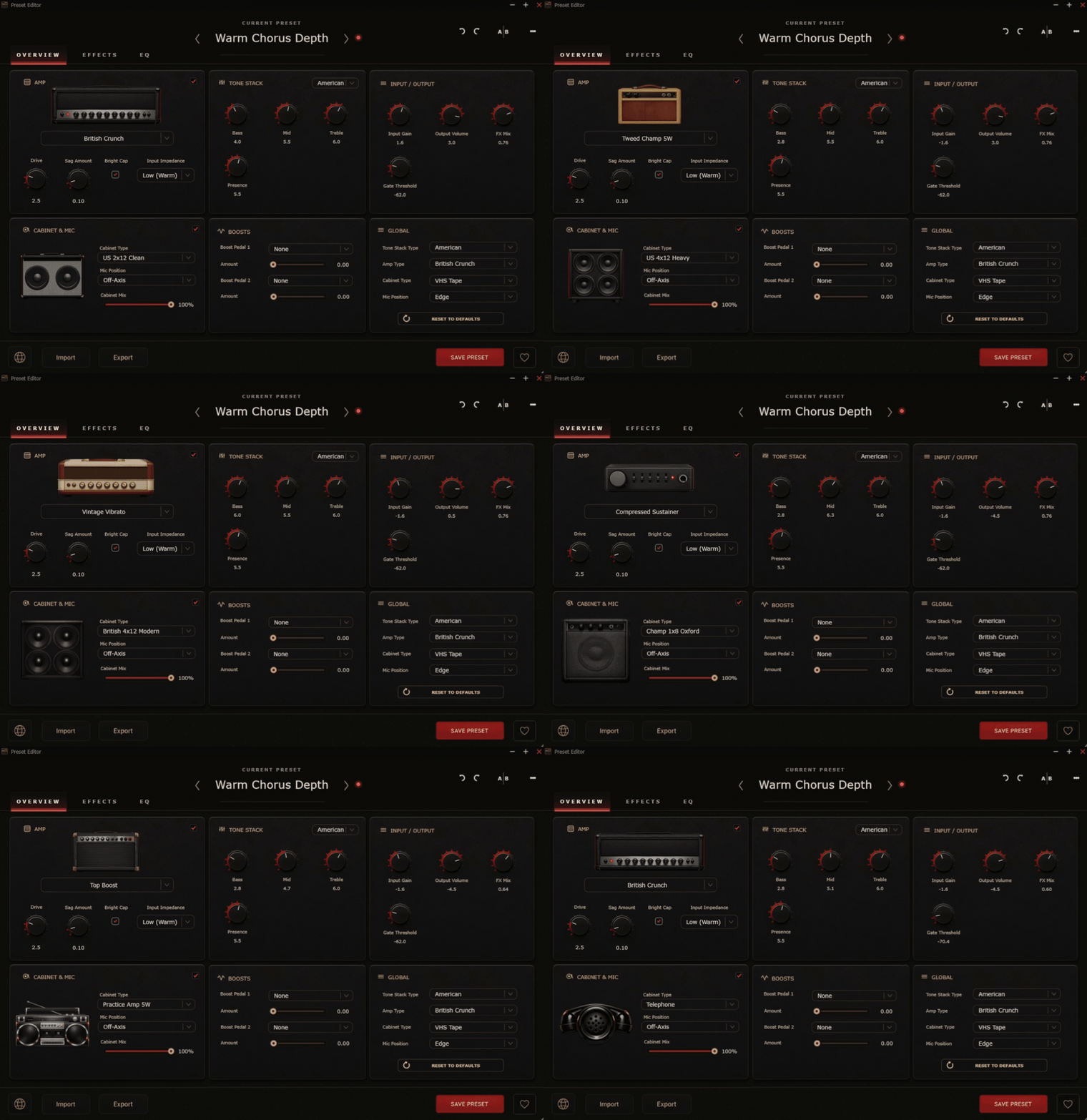
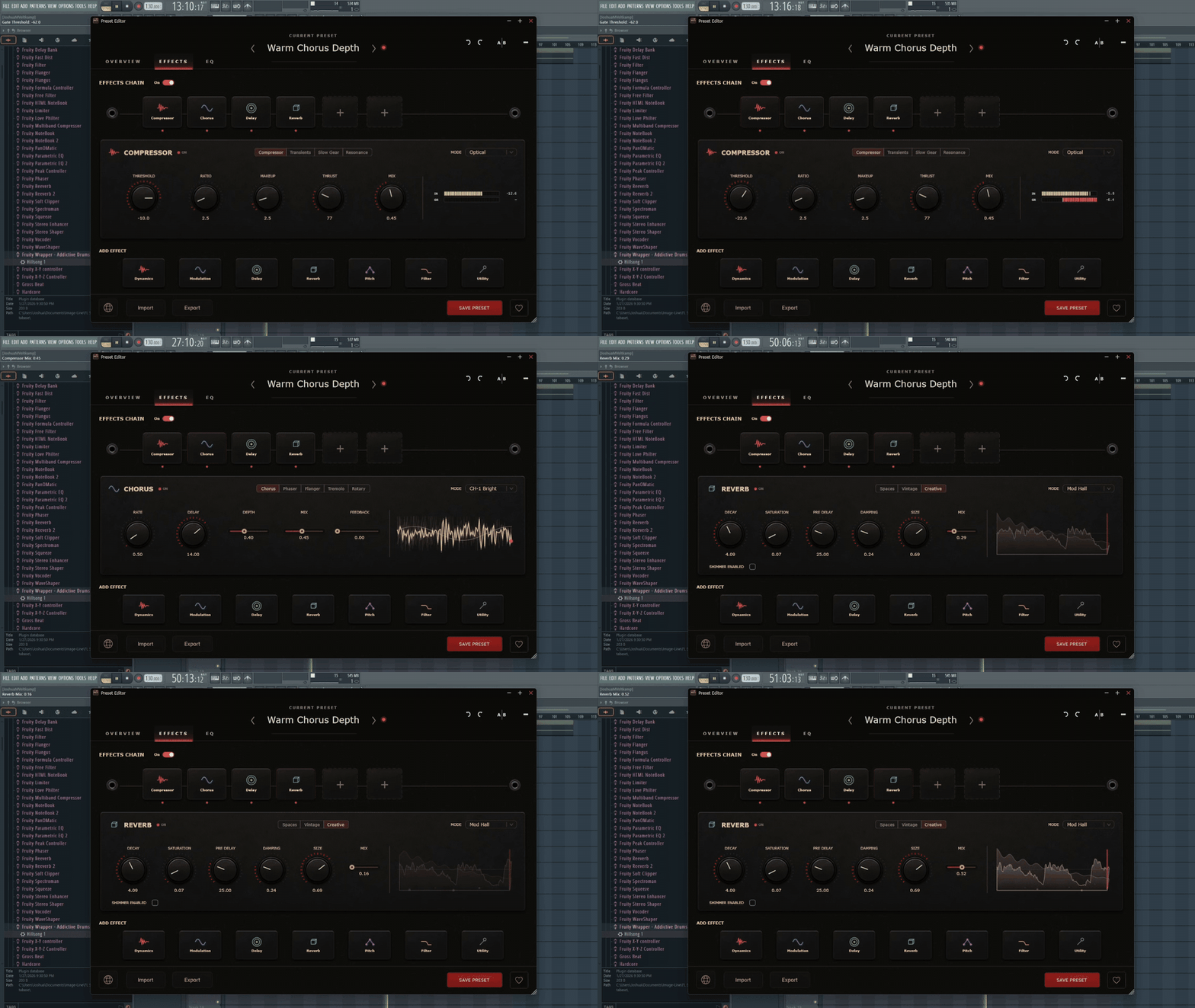
Effects is the biggest change. The old Effects tab was a scrolling wall of knobs grouped by effect; the new one is a proper chain rack. Every enabled effect gets a colored pill icon you can drag to reorder. Tap a pill and the pane shows that effect's full controls; the pane header has an ON/OFF dot you can click (or shift-right-click the pill in the rack) to bypass without leaving the page. Every primary effect has a small audio-reactive visualizer so you can see the chorus moving or the delay taps decaying as you play.
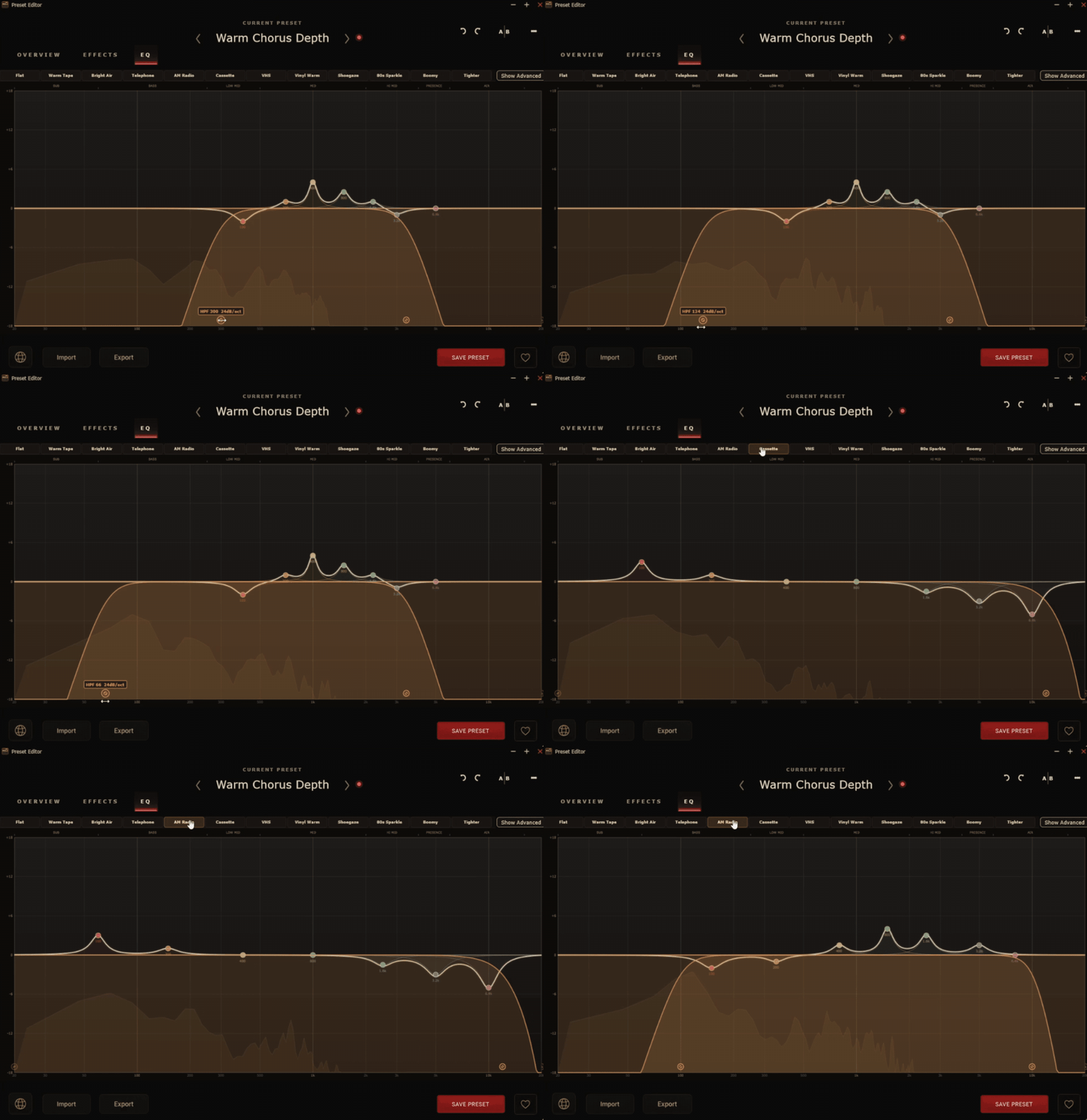
EQ kept the parametric concept from 1.1 but got a redrawn spectrum display and tighter drag interaction on the nodes.
Drag a preset onto the plugin and it stays forever
Roomtone v1.1 added the ability to import a preset from an `.xml` file or a clipboard paste, but the import was session-only. You'd load it, like it, switch to a different preset to compare, and then have no way to get the imported one back without re-dragging the file.
v1.2 fixes that. Any preset you drag onto the plugin window (or onto the Preset Editor window) gets parsed, validated, and then written to disk in your user preset library with an [Imported] prefix. Switch presets all day; it'll be there when you come back.
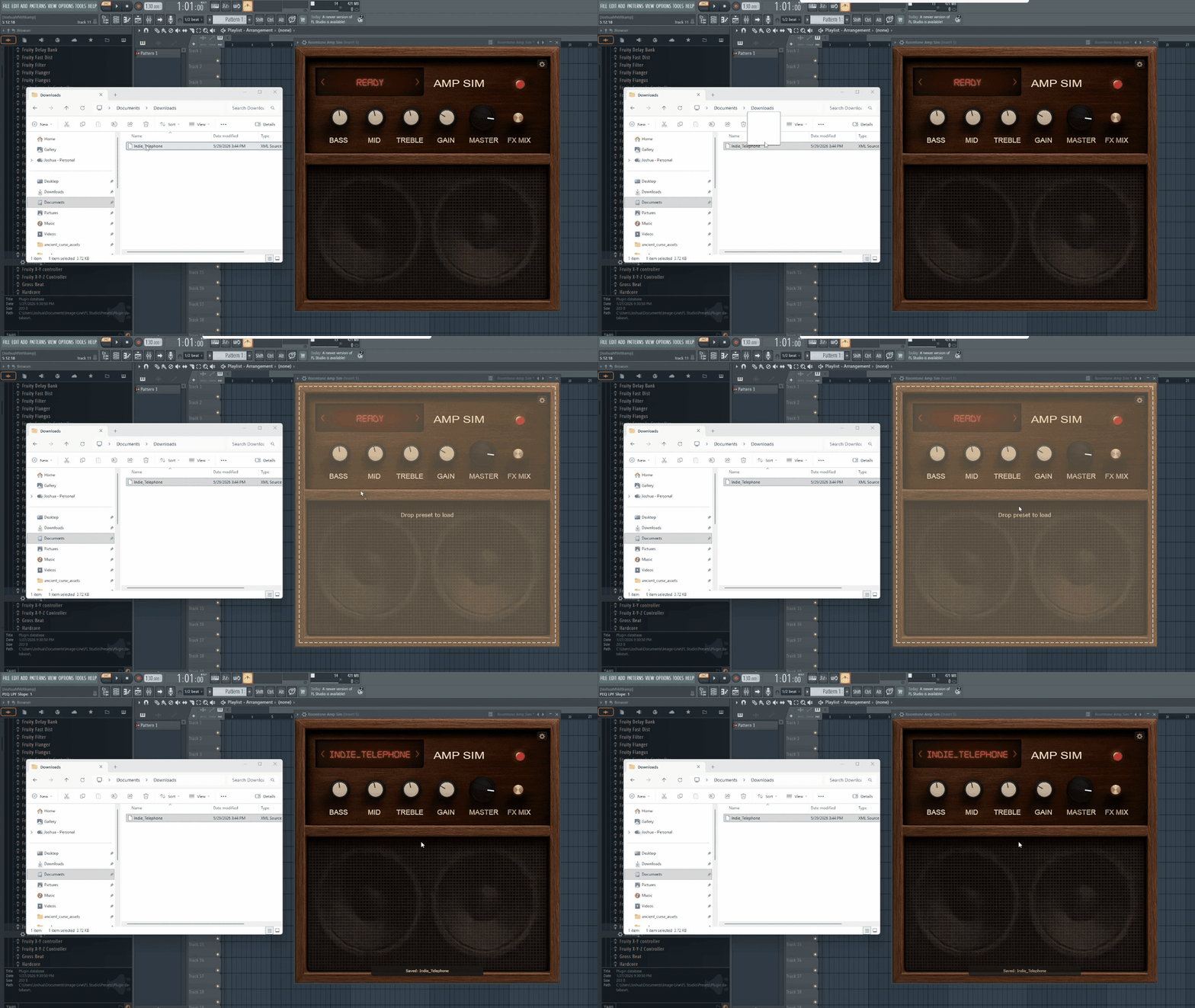
You can drag onto the main plugin UI:
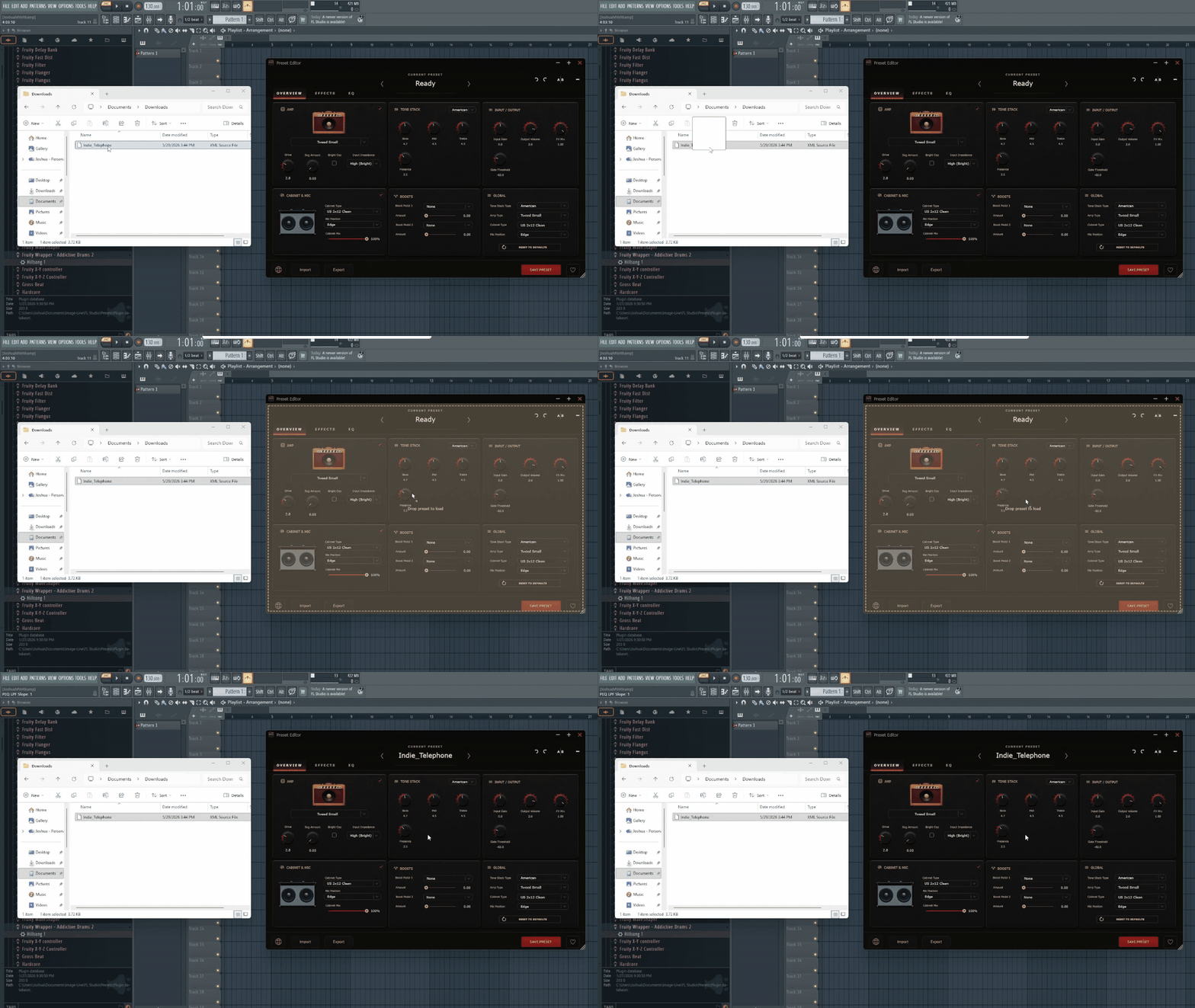
Or the Preset Editor. Either path runs the same security checks (size cap, strict XML validator, allowlist of every element and attribute, numeric range clamps on every parameter) and saves to the same place. If the preset name collides with one you already have, we re-name to avoid the silent overwrite. If you re-drag the exact same file, you get a small "you already have this one" toast instead of a stealth duplicate.
Three new filter effects
We added three filter-family effects to the chain:
- Envelope Filter. auto-wah behaviour that opens and closes with your pick attack. Great for funk + jam-band moves and surprisingly good as a subtle dynamic LP on clean tones.
- Formant Filter. vocal-vowel resonance. Mostly for talkbox-ish moves but also great parked as a static color on lead tones.
- Resonant Sweep. manual filter sweep with a high-Q resonance. Filter dives on the way out of a chorus, tape-style cutoff drops on a clean part, the kind of thing you'd do with a synth filter on a guitar bus.
Each one slots into the chain like every other effect; the visualizer in the rack draws what they're doing so you can see the envelope curves opening on attack.
A community preset library on the website
We finally shipped the community presets page properly. There are two tabs:
- Factory. all 483 factory presets (the plugin shipped with 386 in 1.1; we added 81 more across the artist-research passes), browsable by name, category, and inspiration. Rate them with thumbs up/down or leave detailed feedback, suggest improvements if you've built a better version, and we'll consider promoting community refinements into the factory library in future updates.
- Community. tones submitted by other Roomtone users. Each card shows the artist or style the contributor was going for, the preset's category, and a play button if they attached an audio preview. Tap Download to grab the `.xml` and drag it straight onto your plugin.
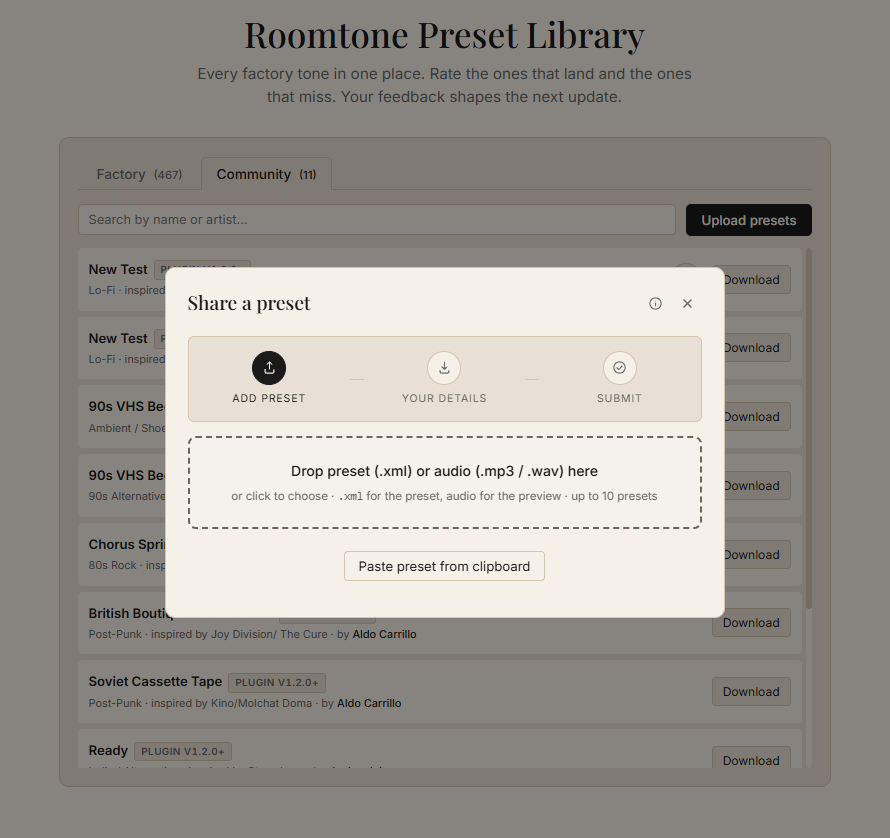
If you've built tones you're proud of, the upload modal accepts the preset XML and an optional audio preview (5 to 10 seconds, your choice). We review every submission before it appears; the trademark policy is the same as it's always been (no artist names in the preset title itself; "inspired by" is fine).
Standalone mode is much friendlier
If you use Roomtone outside a DAW (the `.app` on Mac or the standalone exe on Windows), it now:
- Tells you what to do when no audio device is selected, instead of going silent and confusing.
- Detects audio loopback and warns before it becomes a feedback howl in your speakers.
- Accepts a MIDI footswitch for next/previous preset, effect toggles, or any mapped parameter. Live use just got real.
- Has a friendlier input selector with proper channel labels.
On the install size
Worth being honest about this. v1.2.8 is a much bigger install than v1.1.1 was. The new hero images, effect icons, redrawn EQ display, and the live-tuned layout JSONs all live inside the binary, so the build size grew during the cycle. Mac DMG ended up at 343 MB. Windows EXE at 60 MB. The Mac DMG is also a universal binary, so every code path ships twice (Intel + Apple Silicon).
We did run a lossless PNG optimization pass at the end of the cycle that shaved roughly 68 MB off the Windows installer and 39 MB off the Mac DMG vs. the un-optimized 1.2 build. We weren't going to ship without it. But there's no version of "v1.2.8 is smaller than v1.1.1." It's not. The tradeoff is the redesigned editor + 81 new presets + three new effects + the standalone work below.
If you already own Roomtone
Re-download from your original purchase email and install over your existing copy. Your saved presets, favorites, and any imported user presets all carry over. Open the plugin, open the Preset Editor, click around. The Overview tab (what was Amp & Tone in 1.1) keeps the controls in roughly the same spots so nothing about your usual workflow should feel broken; the Effects tab is the one that'll feel new.
If you're worried about regressions, every prior version is still archived on our server. Visit your original confirmation page and the "Previous versions" panel will let you download v1.1.1, v1.1.0, or v1.0.0 if you ever need to roll back.
If you haven't tried Roomtone yet
It's $29 (one time, lifetime updates, no subscription). The free Worship Guitar plugin we ship alongside it is the easiest way to hear the same DSP engine before you spend a dollar; download both from the Roomtone page.
If you've been waiting for "is this thing actually getting better, or is it a one-shot release," this is the answer. 110 commits since the last public version. We're not done.
Questions, bug reports, or preset submissions? northernvalleyaudio@gmail.com or the upload form at /roomtone-presets.